SPLap: machine data at race pace LIVE ON SPLUNKBASE

A father-daughter project · F1 and machine data

We put a Grand Prix inside Splunk.

The 2025 Italian GP replayed from real telemetry: 20 cars at 3.7 Hz, a circuit rebuilt from the cars' own GPS, and the SPL behind every panel.

Free · Apache-2.0 · no keys, no internet, no LLM · not affiliated with Splunk or Formula 1 · Campaigning for a spot at .conf26 Denver

Real 2025 Italian GP data · 17 sourcetypes · deterministic engineer rules · SPL on every panel · AppInspect-validated

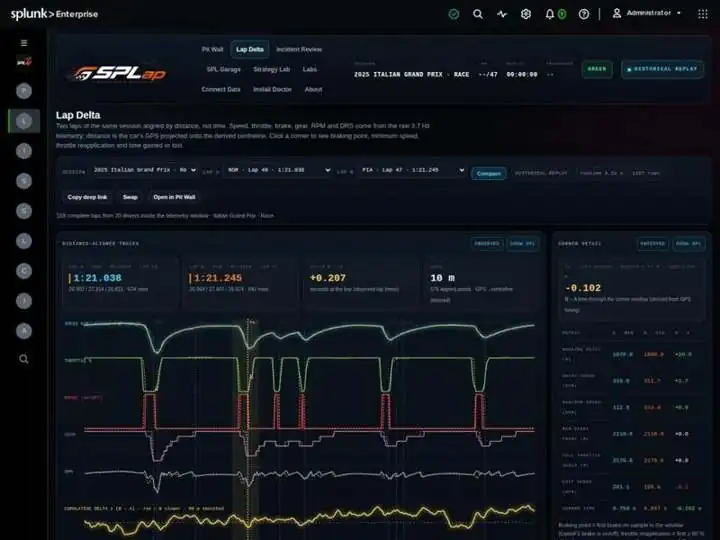
NOR lap 48 vs PIA lap 47 · aligned by distance+0.207seconds at the line · observed lap times
Telemetry rows122,300location + car data
Searches per frame0replay runs in the browser
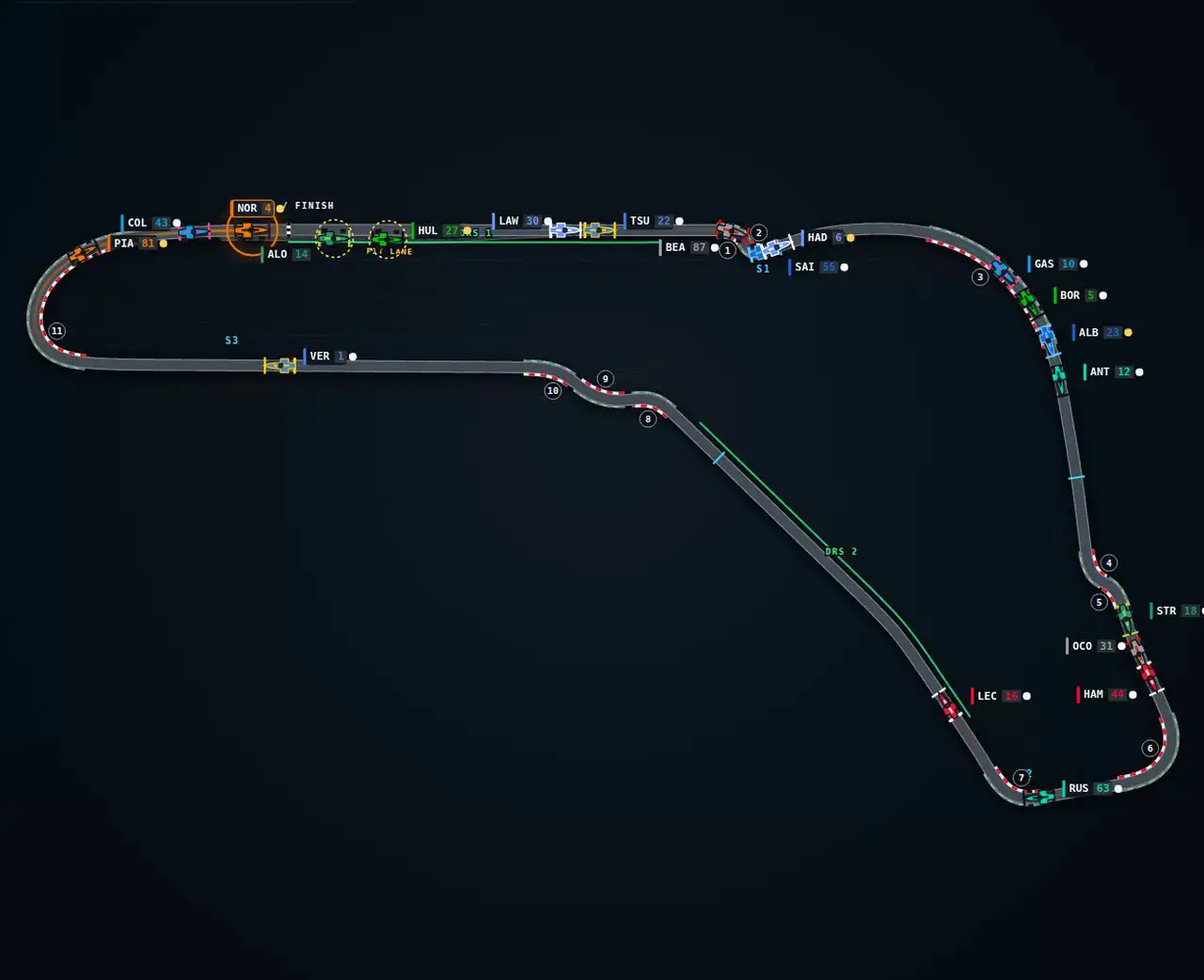
Corners from GPS115,745 m centreline · pit lane too

Why we built it

Built on Sundays by two people who never miss a race.

Lilli wanted to see if the timing screen was lying to us.

She also wanted to learn how real software gets built — the kind with tests and a release and strangers installing it. Lloyd wanted an excuse to model race physics. Neither of us expected the circuit map to come out of the cars' own GPS, or that a Monza pit stop would show up in the data as clearly as it does on TV.

Splunk turned out to be a great place to do it. It swallows a hundred thousand telemetry events without blinking, its search language was made for exactly these time-series questions, and its dashboards let us draw a race instead of a bar chart. We aren't affiliated with Splunk in any way; we just think it's a good platform for this.

Version 2.1 is the groundwork: a clean data model, a real session, deterministic race-engineer findings you can check. The physics is next.
Lloyd Clark & LilliCo-developers · weekends, 2026

What's inside · version 2.2.0

Grounded in the data, not the vibes.

Everything on screen is either observed provider data or labelled as derived. Every chart has a Show SPL button. Nothing is generated by a language model.

13:00:00DATA2025 Italian Grand Prix, Monza, from the community OpenF1 API: laps, sectors, stints, pit stops, positions, intervals, race control, weather, overtakes, team radio, and 3.7 Hz location + car telemetry (speed, RPM, gear, throttle, brake, DRS). Bundled as lookups; import any other session yourself.
14:00:00CIRCUITGeometry derived from the cars' GPS: centreline, pit lane as its own road, sector boundaries, DRS zones, numbered corners. No official track art.
14:00:17PIT WALLHybrid SVG + Canvas renderer, livery-coloured cars with collision-aware labels, timing tower with gap and interval, driver card, 0.25×–4× replay, jump to pit / overtake / flag. Zero searches per animation frame.
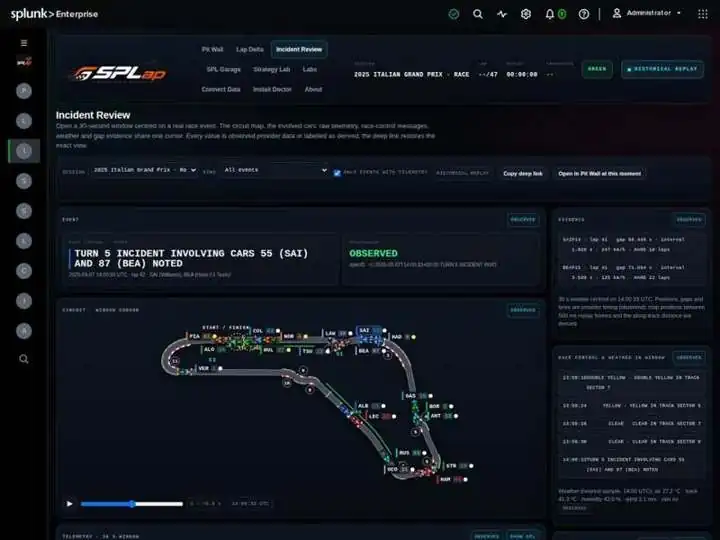
14:00:33INCIDENT"Turn 5 incident involving cars 55 (SAI) and 87 (BEA) noted." A 30-second evidence window around any race-control message, overtake or pit stop, with map, both cars' telemetry, gaps and weather on one cursor.
14:05:52LAP DELTAAny two laps aligned by distance. Click a corner for braking point, minimum speed, throttle reapplication and time gained or lost.
14:07:14ENGINEERDeterministic findings — pit-loss anomaly, undercut/overcut, tyre degradation change, battle closing rate, braking-point change — each with rule version, confidence, provenance, evidence and the SPL that reproduces it.
SCHEMAsplap.canonical/1: one index, 17 sourcetypes, provenance on every event, idempotent import id. Import wizard in the browser, offline race bundles with checksums, or a Python CLI. Credentials never touch browser code.

Engineering notes, published: Canonical data schema · Data sources · Importing a race · Visualization architecture. The package also ships the full release evidence (AppInspect, clean install, browser suite).

20 seconds inside the appLap Delta, corner by corner, then an Incident Review window playing. Recorded from a stock Splunk Enterprise 10 install, nothing staged.

Rated 5.0 by Splunk users on Splunkbase

Get it free on Splunkbase

Installs in a minute. Nothing to configure. And if it makes you grin, a rating over there keeps a two-person project going.

If you build on Splunk

Zero searches per frame

The replay is precomputed into frames and drawn on Canvas; SPL builds the world, the browser runs it. No SearchManager in the animation loop.

One schema, provenance on every event

splap.canonical/1: 17 sourcetypes, each event tagged observed or derived, idempotent import ids so a re-import cannot double-count.

Findings you can reproduce

Every race-engineer finding carries a rule id, version, confidence and the exact SPL. No language model anywhere in the pipeline.

Next release · in the garage

Next: the physics.

2.1 is the data foundation. The next version turns SPLap from a viewer into something you can argue with — every model labelled with its confidence and its SPL, same as today.

  1. Tyres

    Degradation curves

    Lap time versus tyre age per compound and stint, with fuel load and traffic corrected out. "This stint is losing 0.08 s per lap" — with error bars.

  2. Strategy

    Undercut simulator

    Drag a pit stop on the timeline and watch the projected running order, built on the pit-loss we measure and the degradation we fit.

  3. Driving

    Corner-by-corner analysis

    "VER brakes 8 m later into Turn 1 than NOR." Braking points, minimum speeds and throttle pickup projected onto the track.

  4. Energy

    Deployment inference

    Where the battery is spent on the straights, inferred from speed and throttle traces.

  5. Race story

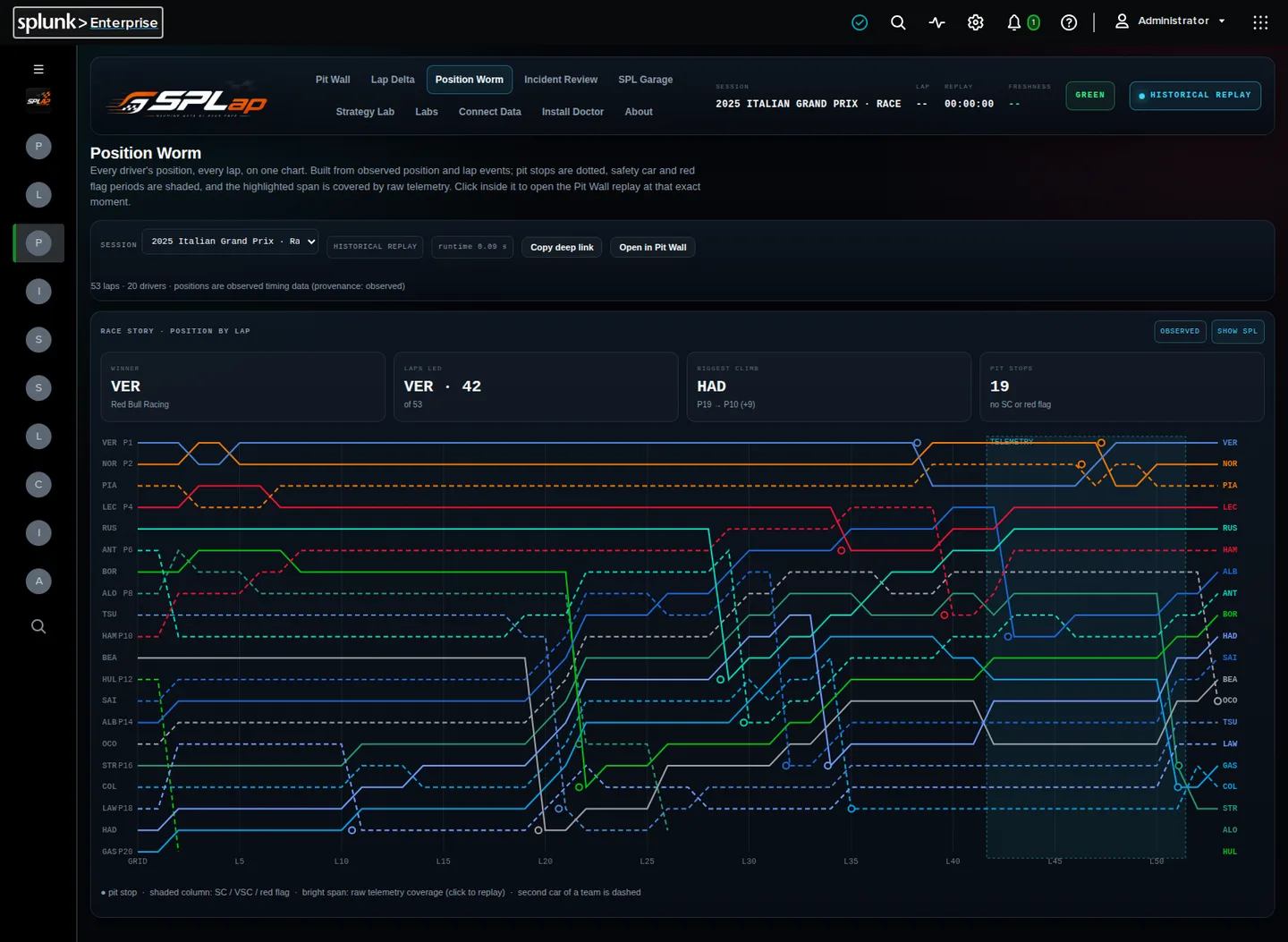
    The position worm

    Lap-by-lap positions for the whole field with overtakes and stops marked; click anywhere to seek the replay.

  6. What-if

    Re-run the race

    Change one strategy call and watch the race replay under the new plan. The big one.

Stint ordersoftmediumhard

Get it

Install in a minute.

  1. 1
    Grab the package from Splunkbase.
  2. 2
    Splunk Web → Apps → Manage Apps → Install app from file. Or splunk install app splap-2.2.0.tar.gz.
  3. 3
    Open SPLap. Monza is already moving. No setup page, no index, no internet.
  4. 4
    Want a different race? Connect Data → Import Historical Race, pick a season and a Grand Prix.

Splunk Enterprise 10.x and Splunk Cloud Platform (AppInspect-validated).

No Splunk? Ten minutes on a laptop

Splunk Enterprise has a free trial and runs fine in Docker. Three commands and Monza is moving:

docker run -d --name splap -p 8000:8000 -e SPLUNK_START_ARGS=--accept-license -e SPLUNK_PASSWORD=ChangeMe-123 splunk/splunk:latest
docker cp splap-2.2.0.tar.gz splap:/tmp/ && docker exec splap sudo /opt/splunk/bin/splunk install app /tmp/splap-2.2.0.tar.gz -auth admin:ChangeMe-123
open http://localhost:8000/en-US/app/splap/pit_wall

Feedback

Tell us what you'd like to see.

Opens your mail app with the message ready. We read every one, usually within a day. No list, no newsletter.
Your mail app should be open. If it isn't, write to lc@federal.ai.

Questions

Things people ask.

Is SPLap affiliated with Splunk or Formula 1?

No. It is an independent, non-commercial project by two people who like both. Splunk is a trademark of Splunk LLC; Formula 1 marks belong to their owners. We just think Splunk is a good platform for this kind of time-series work.

Is it free?

Yes. Apache-2.0 licensed, free on Splunkbase, no keys, no sign-up, no telemetry sent anywhere.

Does it need internet access?

No. The 2025 Italian Grand Prix ships inside the package as lookups. Internet is only needed if you choose to import another session from the OpenF1 API.

Does it use AI or a language model?

No. Every finding comes from a deterministic rule with a version, a confidence and the SPL that reproduces it. Nothing on screen is generated.

Which Splunk versions does it run on?

Splunk Enterprise 10.x and Splunk Cloud Platform. It passed AppInspect for both. The free Splunk Enterprise trial in Docker runs it on a laptop.

Can I load a different race?

Yes. Connect Data, then Import Historical Race: pick a season, a Grand Prix and a session. Or use an offline bundle, or the Python CLI. Every import gets an idempotent id so re-importing cannot double-count.

Where does the data come from?

The community OpenF1 API under its non-commercial terms: laps, sectors, stints, pit stops, positions, intervals, race control, weather, team radio and 3.7 Hz location and car telemetry. The circuit geometry is derived from the cars' own GPS, not from official track art.

Who built it?

Lloyd Clark and his daughter Lilli, on weekends, as a way to learn how real software gets shipped and to lay the groundwork for modelling race physics.